PICAZHU: Free Desktop Photo Viewer & Image Browser — Browse your media.
Not someone else's library.
Point to your real folders. Index photos and videos instantly. Browse everything through a fast, beautiful, folder-first photo viewer — without importing a single file.
A visual photo viewer & image browser.
Not a bloated photo manager.
Point to a folder
Choose any folder on your drive
Index instantly
Lightning-fast media discovery
Browse beautifully
Visual grid, previews, details
Files stay put
No imports, no copies, no lock-in
Photos browsed smoothly
Indexing speed
Files moved or copied
Your control, your folders
A complete photo viewer & image browser —
everything you need. Nothing you don't.
Folder-first navigation
Your real directory structure, front and center. Breadcrumbs, pinned, recent.
Virtualized media grid
Smooth scrolling across thousands of files with adjustable thumbnail size.
Preview & inspector panel
EXIF, GPS, camera info, video codec, and full preview in one view.
Quick preview
Instant full-screen preview — Space for native Quick Look on macOS.
Search & saved searches
Filenames, paths, metadata, OCR, and AI tags. Save any query for one-click recall.
Smart filter chips
Images, videos, date ranges, file size, AI-analyzed, favorites — all combine with search.
Favorites
Star any photo or video. Filter to show only your best work.
Tag cloud sidebar
AI tags sized by frequency. Click any tag to filter your whole library instantly.
Pinned & recent folders
Bookmark your most important locations and jump back fast.
HEIC support
Windows WIC + bundled libheif fallback. Modern camera formats just work.
iPhone import (Windows)
USB import via portable-device access. Visual picker, dedupe, auto-rename.
Drag & drop folders
Drop folders from Finder or Explorer to add them as watched roots.
Live folder watching
FSEvents-based monitoring picks up adds, deletes, renames, and moves automatically.
Light & dark themes
Runtime theme switching backed by tested dynamic resources.
Select & export originals
Multi-select with keyboard or mouse. Export real files — no conversions, no lock-in.
Video playback & previews
Visual video cards with full preview and playback, not just thumbnails.
Right-click actions
Open, reveal in folder, copy path, export, analyze, clear AI — all from context menus.
Keyboard navigation
Arrow keys move selection, Enter opens, Cmd/Ctrl shortcuts for everything.
Diagnostics & recovery
Find broken files, surface stale bookmarks, rebuild the catalog any time.
Streaming indexing
500-file batches commit progressively. Pause, resume, or stop anytime.
Built for creatives who
manage real-world photo collections.


The old way
The PICAZHU way
See the photo viewer in action.
Interactive mockups of the PICAZHU image browser interface.
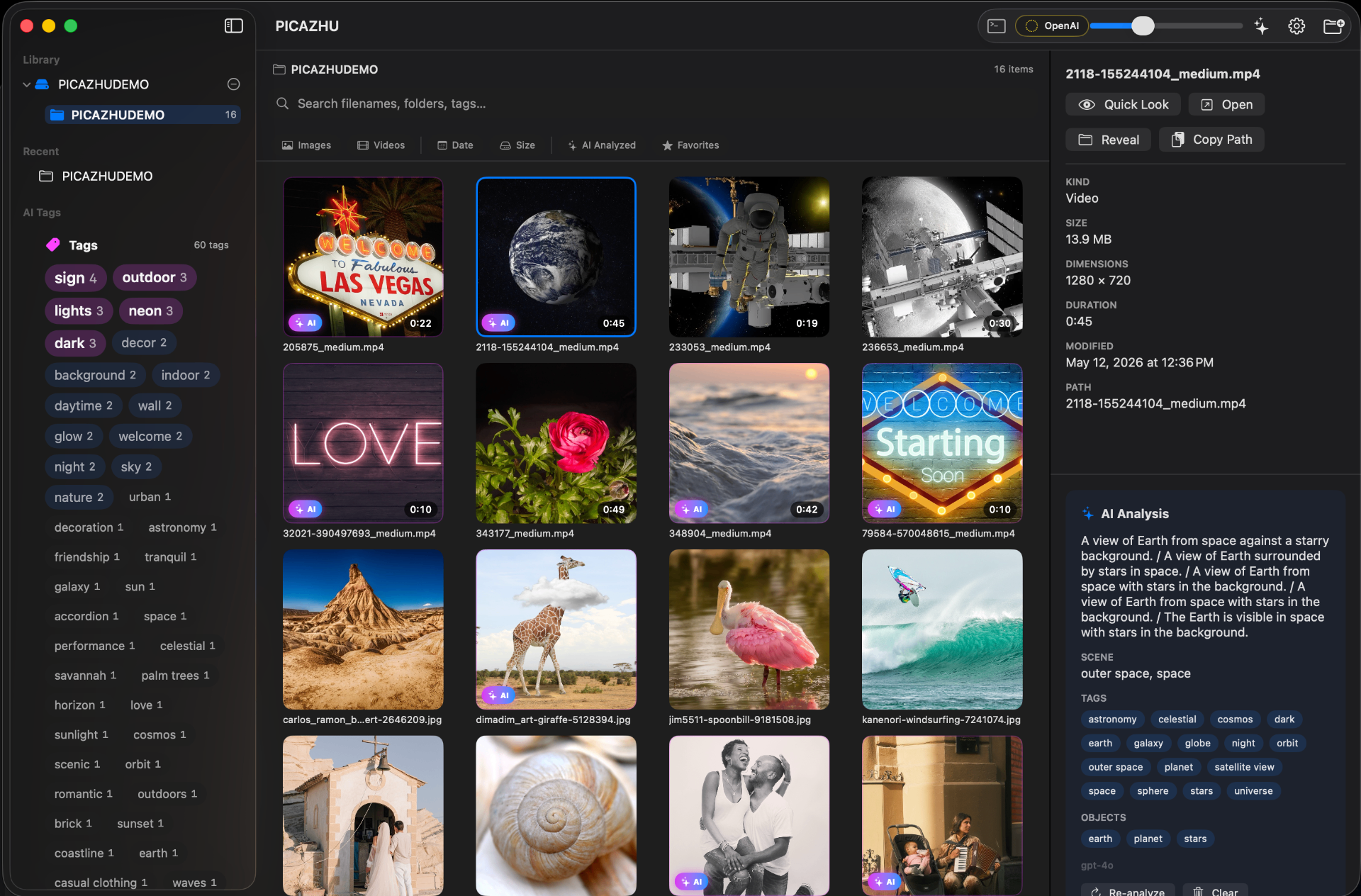
The Full Picture
Library sidebar, media grid, preview panel, and live indexing status — all in one clean, focused interface.
Folder-First Navigation
Your real directory structure, pinned folders, recent locations, and saved searches — all curated entry points into your media library.
Preview & Details
Inspect any image or video before opening it. Open originals, show in folder, or launch Quick Preview — all one click away.
Visual Media Grid
Browse your photos and videos in a responsive grid with real file paths, dimensions, and metadata at a glance.
Quick Preview
Focused full-size viewing without leaving the browser. See every detail at full resolution in a dedicated window.
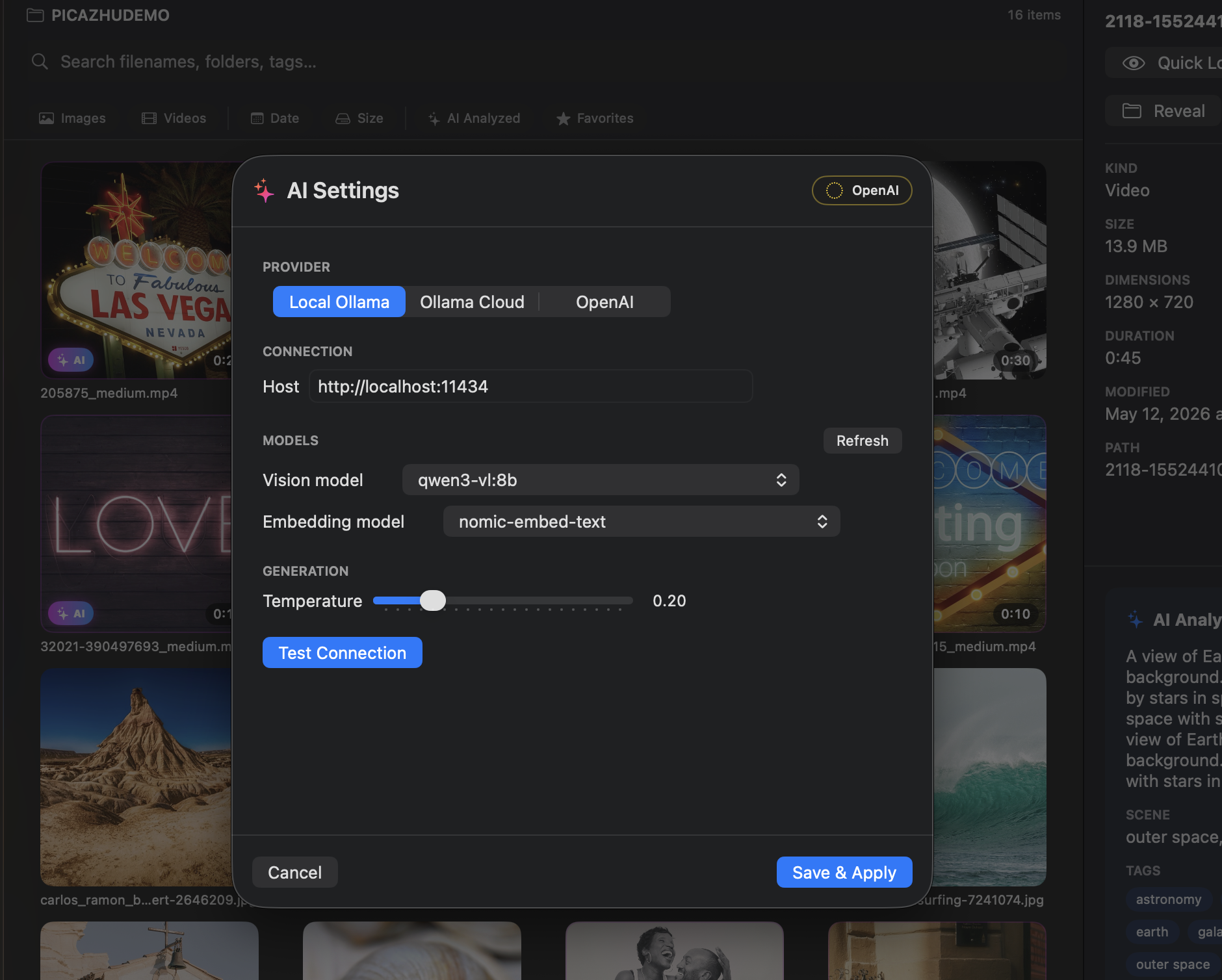
AI & Settings
Configure thumbnail caching, enable AI globally, and connect your local Ollama endpoint — all from the settings panel.

Your files. Your rules.
Always.
No uploads, no cloud, no accounts
Everything stays on your computer. No sign-ups, no subscriptions, no telemetry.
AI is always your choice
Off by default. Run fully local with Ollama or LM Studio, or pick a cloud provider — your call, one toggle.
Thumbnails-only to AI
AI models only ever see 512px thumbnails from the cache. Your original files never leave the app.
Local SQLite catalog
WAL-mode database, crash-safe, lives under your user folder. No background sync, no remote storage.
Pause, resume, or stop anytime
You're in charge of indexing. Walk away and pick up where you left off.
Export originals — never locked in
Files are never converted or trapped. Export the real thing — proprietary library not required.
Available on Windows and macOS
Native desktop apps built for performance and reliability — open source on GitHub.

Future-ready intelligence.
Always optional.
Per-folder opt-in
Right-click any folder to analyze it. Nothing runs automatically — you decide what gets processed.
Structured visual tagging
Caption, 5–15 tags, detected objects, scene, and confidence score for every image.
Apple Vision OCR
On-device text extraction from signs, labels, and screens — fully searchable across your library.
10-language OCR
English, Russian, French, German, Spanish, Italian, Portuguese, Chinese, Japanese, Korean.
Video keyframe analysis
Extracts 5 frames per video, runs VLM + OCR in parallel, merges into one searchable result.
Hybrid semantic search
FTS5 full-text + cosine-similarity ranking over caption embeddings. Search what you mean.
Cross-library tag merging
On the roadmap · Unified tag taxonomy across all your watched roots.
Embeddings on Windows
On the roadmap · Hybrid semantic ranking parity coming to the Windows build.
How PICAZHU works — three steps. That's it.
Choose your folders
Point PICAZHU at any directory on your drive.
PICAZHU indexes everything
Photos, videos, metadata — discovered in seconds.
Browse, search, preview
A fast visual interface built for real workflows.
Select and export your best work
Pick favourites, export originals. No conversions, no lock-in.
Frequently asked questions
Everything you need to know about PICAZHU.

Your photos deserve a better organizer
than a bloated library.
Get PICAZHU and take back control of your media workflow. Fast, visual, and built for the way you actually work.
Windows — Open Source
Download the latest signed-ready installer or portable build, browse releases, file issues, or contribute on GitHub.
View on GitHubBrowse releases →